
27 April, 2026

Your React-based architecture was likely chosen for developer velocity, but for many scaling businesses, it has created a hidden "Indexing Tax." If your Google Search Console is dominated by "Discovered – currently not indexed" statuses, you are likely facing a rendering bottleneck that no SEO agency or content strategy can fix. It is an engineering problem with a direct impact on your Customer Acquisition Cost (CAC).
This guide breaks down why traditional React SPAs fail Google’s rendering budget and how Next.js 16 serves as the structural solution.
Key Takeaways for Decision-Makers:
Your React app has been live for months, yet Google Search Console still shows half your pages stuck at "Discovered currently not indexed." This is not a marketing issue; you are funding paid acquisition to cover for an engineering decision made two years ago. Client-side rendering made your app fast to build and invisible to crawlers. Next.js for SEO optimization is now the default answer for teams who want their React investment to actually show up in search results. The rest of this post explains why, and what the fix looks like in real engineering weeks.
Next.js 16 is a React framework that renders pages on the server (or at build time) and delivers fully-formed HTML to search engines before any JavaScript executes. That single architectural shift, server-first rendering with a Metadata API baked in, makes pages crawlable, indexable, and rankable by default. For CTOs evaluating the Next.js vs React SEO difference, the core distinction is that your content is in the initial response rather than requiring a second-pass render that may never happen.
When marketing escalates an indexing issue, it usually lands on your desk as a vague "SEO problem." It is not. It is a direct consequence of how your frontend delivers HTML to Googlebot, which means the fix lives in your repo, not in a content calendar.
Crawling is Googlebot fetching your URL. Rendering is Googlebot executing your JavaScript to see the final DOM. Indexing is Google deciding the rendered content is worth storing.
React SPAs pass step one, stall at step two, and never reach step three. The HTML shell that ships contains a `
` and a bundle reference that nothing Google can read until the JS runs, which it often does not.
That specific GSC status means Google knows the URL exists but chose not to spend its render budget on it. For content-heavy sites, this occasionally signals a quality issue. For a React SPA, it almost always means the initial HTML is empty, and Google deprioritized the second-wave render. This is one of the most common React indexing issues Google surfaces.
Every pricing page, landing page, or feature page stuck outside the index is a page you now drive traffic to through paid channels. The React crawling issues your team treats as a technical curiosity are a direct line item on your CAC.
The cost of un-indexed pages rarely shows up as a clean number on a dashboard. It surfaces as rising paid spend, stalled content ROI, and GTM launches that underperform for reasons nobody can quite pin down.
Take your average blended CAC and multiply it by the organic sessions a comparable indexed competitor captures monthly. That is the shadow budget your rendering architecture forces you to spend. For most mid-market SaaS companies, it exceeds the entire migration cost.
Every new feature page your marketing team ships goes into the same void. You invest in content, design, and positioning, then deliver it through a frontend that Google cannot read. Content marketing ROI is impossible to measure fairly until the rendering layer is fixed.
Google's trust in a domain is cumulative. The longer your pages sit outside the index, the more aggressively Google deprioritizes crawling them. "A migration that could recover indexing quickly today becomes significantly harder after extended neglect. Google's deprioritization of ignored URLs compounds over time."
Your team is not wrong about React; it is a solid runtime. The problem is what happens between Googlebot requesting your URL and your content actually appearing in a form it can index. Three specific failures explain almost every React indexing issue Google flags.
Google's documentation says it renders JavaScript in a second wave. Your team has likely cited this to defend the current architecture. What the docs do not say is that the second wave is unreliable, deprioritized, and often skipped entirely for low-authority domains or large sites. Relying on it means relying on a best-effort service with no SLA. This is the root of most client-side rendering SEO issues.
Googlebot gives every page a finite execution budget. Heavy bundles, third-party scripts, and waterfall API calls routinely exceed it. When that happens, Google indexes whatever partial DOM existed at timeout, often your loading skeleton or an empty container.
React Router injects meta tags after hydration. If hydration fails or lags, Google sees either your default meta tags or none at all. Every dynamic route product page, blog posts, and category pages inherit this blind spot, which is why React JavaScript SEO problems cluster around exactly the pages you most want to rank.
Before you greenlight a migration budget, confirm the diagnosis. The following audit takes under an hour and gives you the evidence you need to justify the engineering investment internally.
Open Google Search Console, inspect any un-indexed URL, and click "View Rendered HTML." If the rendered output is missing your actual content, headings, or internal links, the rendering layer is the problem. No further investigation needed. This answers the question "why is my React app not indexed by Google" in under five minutes.
A rendering issue shows as large clusters of "Discovered – currently not indexed" across structurally similar routes (all product pages, all blog posts). A content issue is scattered and inconsistent. Pattern recognition here saves weeks of misdiagnosis.
Before migration kickoff, your team should audit:
Our team has documented the full checklist in our Next.js SEO implementation guide, a useful reference before your team starts the audit.
Next.js is not a rebrand of React. It is a rendering architecture that solves the exact problem your SPA creates, and Next.js 16 ships the cleanest version of that architecture to date. The Next.js SEO benefits are not theoretical; they are the direct inverse of every React crawling issue described above.
Server Components render on the server and ship zero JavaScript for static parts of the page. Streaming SSR sends HTML as it generates, so Googlebot sees content immediately. The Metadata API handles title tags, OG tags, and canonicals at the route level, with no hydration dependency, no timing bugs. This directly addresses how server-side rendering improves SEO.
Our deeper breakdown of React Server Components covers the execution model in detail.
App Router is the default in Next.js 16 and the correct choice for any new SEO-critical work. Pages Router still works and is fine for legacy routes mid-migration, but all new investment should target App Router to avoid migrating twice. This is a key consideration in Next.js 16 SEO features.
You inherit faster LCP from server rendering, better CLS from stable HTML, and improved FID from smaller client bundles. You still have to earn good INP, image optimization discipline, and third-party script budgets. Core Web Vitals improvement is a starting benefit, not a finish line.
If you are weighing whether Next.js is better for SEO than React, the Core Web Vitals data alone answers the question for most production workloads.
Next.js gives you four rendering strategies. Picking the wrong one for a given page type is how teams ship a migration and still underperform. Match the strategy to the page.
These pages change rarely and need to load instantly. Static Site Generation pre-renders them at build time, for the fastest possible delivery, zero server load, perfect for crawlers. Use ISR when marketing wants to edit copy without a full deploy.
Catalogs with live inventory, personalized content, or tenant-specific data need server-side rendering or React Server Components. These render per-request with fresh data while still delivering full HTML to crawlers. The Next.js server-side rendering benefits here directly solve dynamic content indexing.
ISR regenerates pages on a schedule or on demand. New posts get indexed quickly, old posts stay fast, and you avoid rebuilding ten thousand pages every time one changes.
Multi-language sites need hreflang emitted via the Metadata API. Preview deployments should be blocked from indexing via robots headers. Authenticated routes should return proper status codes so Google does not waste crawl budget on login walls.
Route strategy mapping is one of the first exercises a senior Next.js team should run during discovery, as it prevents the wrong rendering decisions from being baked into the migration plan.
A real migration is not a rewrite; it is a staged architectural shift. Here is what a senior team ships in the first six weeks when you migrate React to Next.js properly.
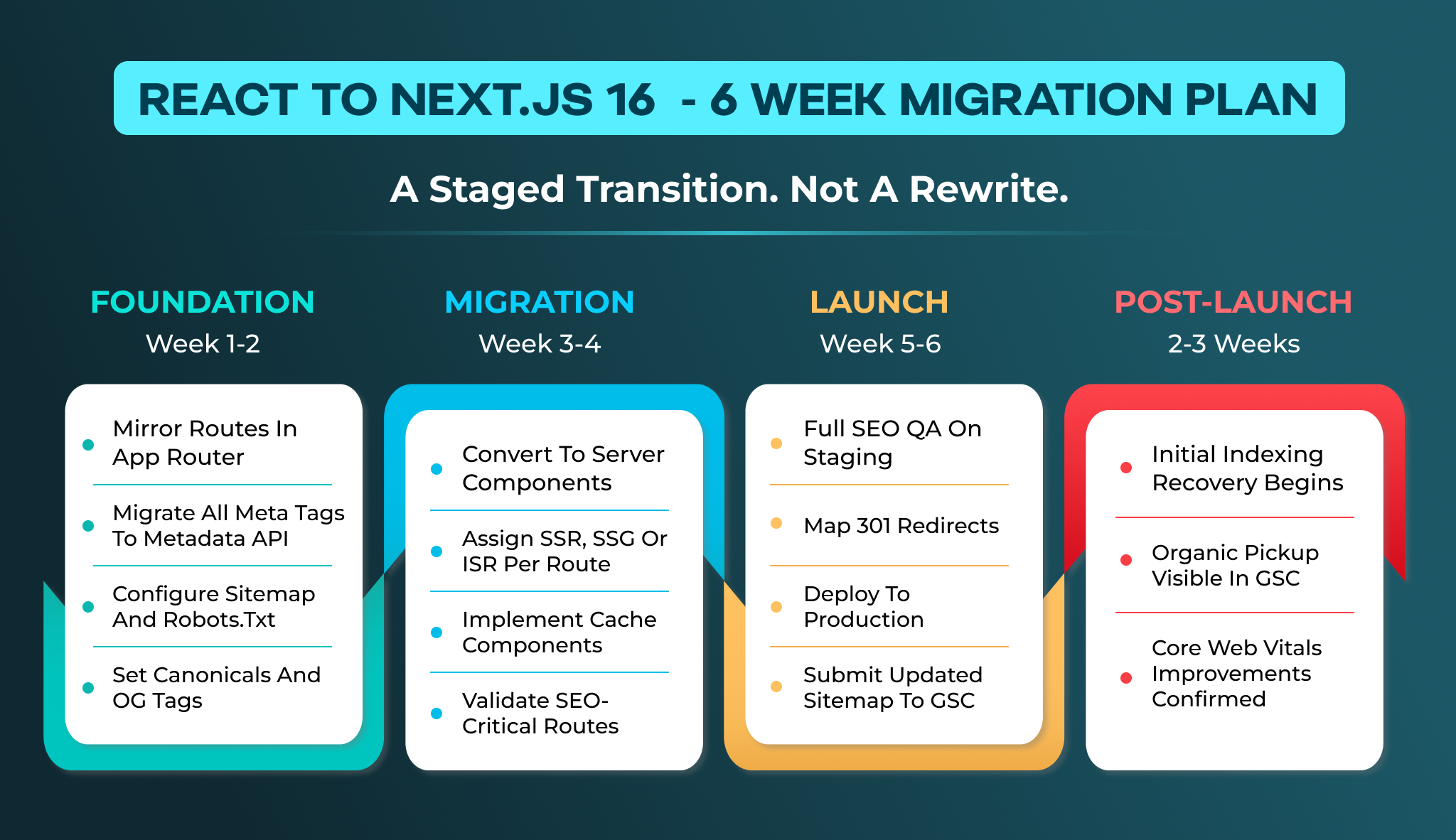
Mirror your existing routes in the App Router. Migrate every meta tag, canonical, and OG tag to the Metadata API. Generate a proper sitemap and configure robots.txt to guide crawl priority. This phase establishes the foundation for how to fix React indexing issues at the structural level.
Convert components to Server Components where possible. Assign SSR, SSG, or ISR to each route based on the decision framework above. This is where React to Next.js migration SEO improvements begin to materialize in your GSC data.
Run full SEO QA against the staging environment. Map 301 redirects for any URL structure changes. Deploy to production and monitor GSC for indexing pickup. Most teams see initial indexing recovery within 2–3 weeks of deployment.
iSyncEvolution has a dedicated team model, which means the same developers who start your migration see it through to indexing recovery. Our full-stack development services include migration planning as a standard engagement phase.
Not every agency understands the intersection of rendering architecture and search visibility. When evaluating Next.js migration services in the US or UK, look for these indicators.
Your partner should speak fluently about Server Components, streaming architecture, and the Metadata API, not just "we build Next.js apps." Ask how they would handle your specific route types.
Migration without SEO QA is a half-finished project. Your partner should include sitemap generation, canonical configuration, and GSC monitoring as standard deliverables. SEO services are built to integrate directly with development workflows.
The transition process between discovery, development, and quality assurance often leads to significant communication gaps. This occurs because the engineers responsible for outlining the migration strategy are the same individuals who carry out its implementation, potentially leaving crucial details overlooked during the handoff.
If you need to hire Next.js developers or hire an SEO expert who understands rendering architecture, we staff both disciplines under one engagement.
React crawling issues are not a mystery and not a marketing problem. They are the predictable result of client-side rendering architecture meeting Google's render budget constraints. Next.js for SEO optimization resolves this at the structural level, delivering server-rendered HTML, route-level metadata, and Core Web Vitals improvements that make your pages indexable by default.
Every quarter you delay compounds the recovery timeline. The engineering investment to migrate React to Next.js is measurable, the ROI is direct, and the alternative is continuing to fund paid acquisition for pages that should rank organically.
If your GSC data confirms a rendering problem and you want to scope a migration with a team that has delivered projects across multiple countries, talk to iSyncEvolution's Next.js development team about your specific architecture.

React SPAs deliver empty HTML shells that require JavaScript execution to render content. Google's second-wave rendering is deprioritized and often skipped for large sites or low-authority domains, leaving your pages outside the index.
Yes. Next.js delivers server-rendered HTML that contains your actual content, meta tags, and internal links on the first response. This eliminates the rendering dependency that causes React indexing failures.
Server-side rendering generates complete HTML on the server before sending it to the browser or crawler. Googlebot receives indexable content immediately without waiting for JavaScript execution or spending render budget.
For SEO-critical pages, yes. Next.js solves the architectural problems of empty initial HTML, hydration-dependent meta tags, and JavaScript execution timeouts that cause React SPAs to fail at indexing.
A focused migration for a mid-sized SaaS application typically takes 4–6 weeks with a senior team. Indexing recovery begins within 2–3 weeks of production deployment.
Nikhil Shah is the CTO and Co-Founder of iSyncEvolution, an engineering leader who aligns modern technology best practices with long-term commercial success. A veteran of cloud infrastructure and scalable web/mobile solutions, he specializes in building high-performance software environments. Nikhil helps global brands master their technical roadmaps, optimizing both code performance and development economics to fuel growth.
© 2026 iSyncEvolution Pvt Ltd. All Rights Reserved.