
15 June, 2026
Most React Native migrations fail not because Dart is hard, but because teams enter a self-imposed dark period, abandoning the live app for a full rewrite that surfaces six months later commercially behind. This guide gives you the phased, production-safe path out.
This blueprint covers:
The maintenance cost of staying on React Native doesn't appear on a dashboard; it shows up as sprint after sprint, where more engineering time goes to dependency firefighting than product delivery. If your React Native to Flutter migration is still in the evaluation stage, the Flutter vs React Native 2026 CTO decision guide maps the technical and business trade-offs. This guide picks up where that decision ends.
What follows is a six-phase, production-safe migration process built for teams that cannot freeze feature delivery, a phased approach that keeps the React Native app live and shipping while Flutter is validated in parallel, and only cuts over when your own crash rate and conversion data says it's ready.
The migration decision rarely comes from a single breaking point. It accumulates. A native module drops Kotlin support. A React Native upgrade breaks three third-party dependencies simultaneously. A new hire spends their first three weeks untangling the bridging layer from a six-month-old OS update instead of building anything.
A React Native codebase crosses the migration threshold when the cost of maintaining the bridge architecture exceeds the cost of replacing it. Three or more of the following signals present simultaneously are the indicator:
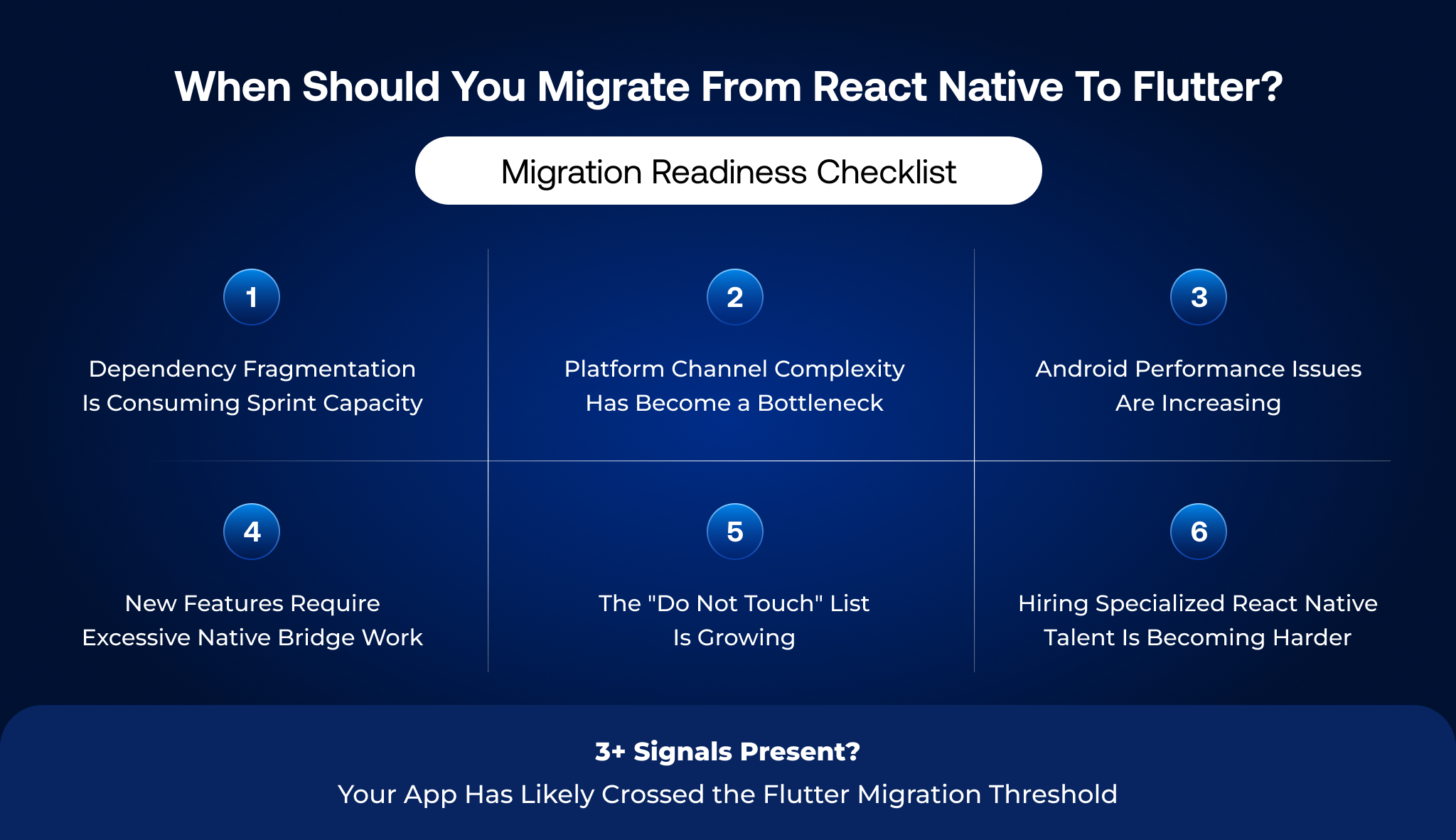
None of these signals individually justifies a migration. Three or more in combination means the maintenance cost of staying on React Native is compounding faster than the cost of a structured move to Flutter.
Before a single line of Dart is written, the most consequential decision is the migration approach. Getting this wrong determines whether your team operates in parallel-delivery mode or enters the feature freeze dark period that kills migration morale and stalls your roadmap.
Comparison of Full Rewrite, Add-to-App, and Module-First Migration Approaches
| Migration Strategy | Best Fit Codebase Profile | Timeline | Delivery Risk |
|---|---|---|---|
| Full Rewrite (Greenfield Flutter) | Under 40 screens, limited third-party integrations, acceptable feature freeze window | 3-6 months | High during rewrite, clean post-launch |
| Incremental Add-to-App | 40+ screens, active feature roadmap, cannot freeze delivery | 6-14 months | Low, distributed across phases |
| Module-First Extraction | High-complexity app, specific screens driving most performance complaints | 4-8 months | Medium limited to the extracted module scope |
The Add-to-App approach embeds Flutter modules inside the existing React Native shell and progressively replaces screens. It is the correct strategy for any production app where business continuity is non-negotiable. Flutter's Add-to-App architecture was purpose-built for this transition pattern.
The full rewrite is defensible only when the codebase is small enough that the rewrite timeline is shorter than the Add-to-App migration, or when the existing architecture is so broken that extracting modules would propagate technical debt into the Flutter build.
The deciding variable is not codebase size; it is the ratio of active feature commitments to migration bandwidth. If your team cannot dedicate 40%+ of engineering capacity to migration work without stalling the roadmap, incremental Add-to-App is the only risk-acceptable path.
This is the sequenced execution pipeline that keeps your React Native app live and shipping while Flutter is built in parallel. Each phase has a defined objective, deliverable, and exit gate before the next phase begins.
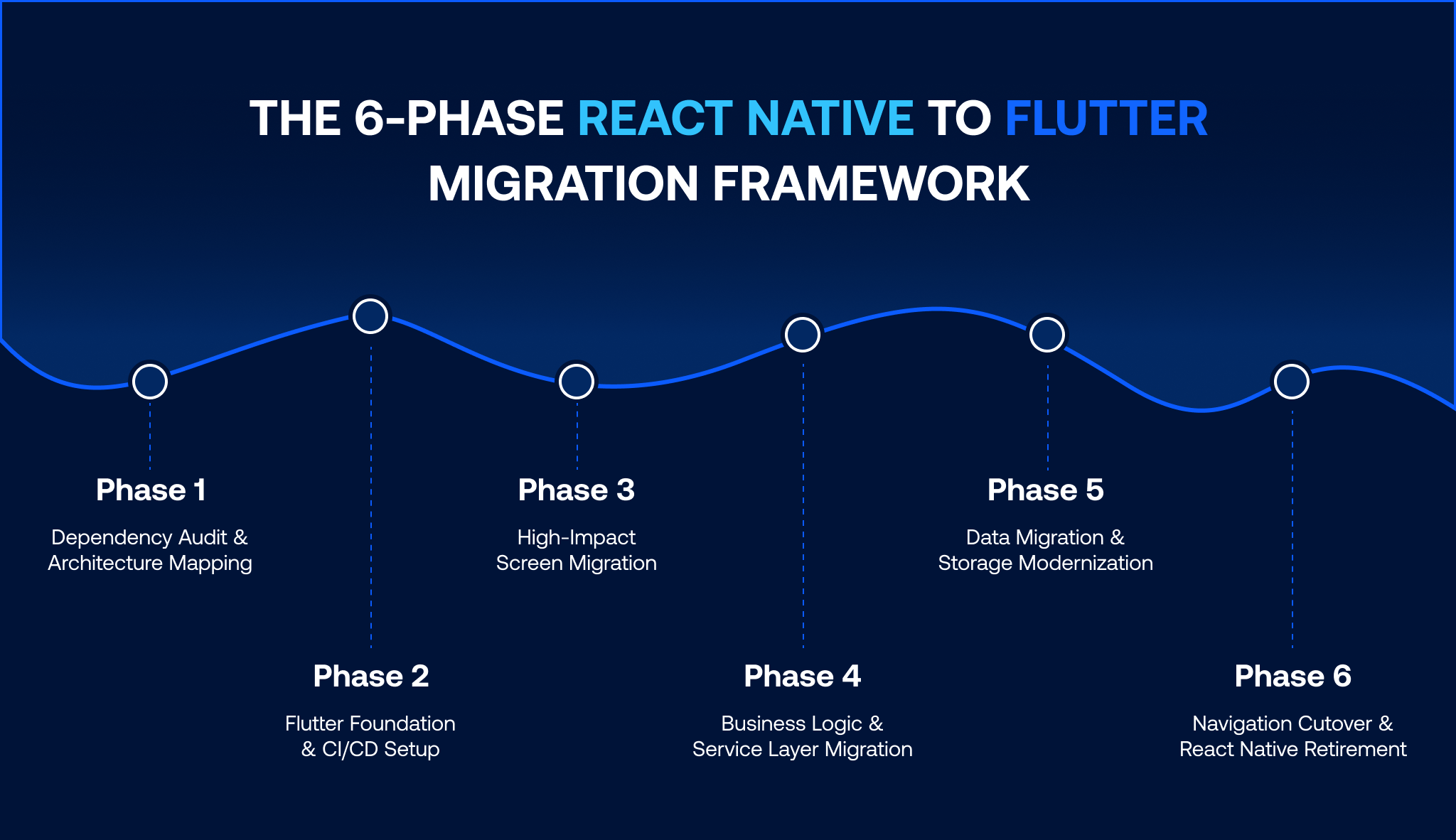
Objective: Create a complete inventory of everything in the React Native app that requires a Flutter equivalent before writing any Dart.
This phase produces a full npm dependency registry classified into three categories: Flutter-equivalent available (direct swap), Flutter-equivalent requiring migration work (custom implementation or platform channel rewrite), and no Flutter equivalent (requires native plugin development). It also produces a platform channel map, a screen hierarchy diagram identifying the 20% of screens driving 80% of user sessions, an AsyncStorage inventory, and a state management dependency map.
Exit gate: The audit is complete and signed off before any Flutter scaffold work begins. Teams that skip this phase discover blocking unknowns mid-migration rather than pre-migration.
React Native Package-to-Flutter Package Migration Reference
| React Native Package | Flutter Equivalent | Migration Complexity |
|---|---|---|
| AsyncStorage | Hive / Isar | Medium schema mapping required |
| React Navigation | GoRouter / Navigator 2.0 | Medium route architecture translation |
| Redux / Redux Toolkit | Riverpod / BLoC | High state pattern rewrite |
| Axios / Fetch | Dio / http | Low direct API pattern port |
| React Native Camera | camera / image_picker | Low |
| React Native Reanimated | Flutter Animations / Rive | High animation logic rewrite |
| React Native Push Notifications | firebase_messaging | Low |
Objective: Set up the Flutter project inside the existing React Native repository and wire it into the CI/CD pipeline before any product code moves.
Key outputs include the Flutter project initialized for Add-to-App with Flutter Engine prewarming enabled, a shared CI/CD pipeline running Flutter and React Native builds in parallel from day one, design token translation (React Native StyleSheet values mapped to Flutter's ThemeData and ColorScheme), a testing infrastructure scaffolded before production code lands, and a Flutter-to-RN bridge module managing navigation handoffs between the two layers.
Critical decision state management architecture: Choose your Flutter state management pattern now, not after screens have migrated. Riverpod, BLoC, and GetX each carry different implications for how business logic migrates from your existing Redux or Context architecture. Teams migrating from Redux will find BLoC's unidirectional data flow maps more cleanly than Riverpod for complex reducer logic.
Objective: Migrate the 20% of screens that drive 80% of user sessions first. This is where migration ROI is realized fastest and where Flutter architecture gets validated under real production load. Teams working with dedicated Flutter engineers complete this phase with pre-built widget test coverage and crash rate monitoring already wired before the first screen goes live.
The migration sequence: identify the three to five screens with highest daily active user contact, rebuild each as a standalone widget module fully isolated from the React Native shell, expose each via FlutterActivity (Android) and FlutterViewController (iOS) behind a feature flag, route 5% of production traffic to the Flutter version while shadow-running both and comparing error rates and performance, then graduate to 100% traffic only after a minimum two-week clean production run.
React Native's useState maps to Riverpod's StateProvider. React Native's useEffect with an empty dependency array maps to initState(). These are not translations; they are rewrites with equivalent intent.
Objective: Extract and port all business logic API services, authentication flows, analytics, and data repositories from the React Native JavaScript layer into Dart service classes. This is the phase where the React Native app becomes a thin navigation shell over Flutter business logic.
The migration sequence runs in this order: API service clients first (port Axios/Fetch to Dio lowest risk because it is pure logic with no UI surface), then authentication and session management (migrate token storage to flutter_secure_storage, with parallel session validation during the overlap period), then analytics event tracking (mirror events to both layers during the transition window to maintain reporting continuity), then push notification handlers (FCM token must remain stable across the migration).
For every React Native Native Module, the Flutter equivalent is built via Method Channel or, preferably, an existing pub.dev plugin. Custom platform channels should only be written for proprietary native integrations with no pub.dev equivalent. Using a plugin where one exists eliminates one of the highest-maintenance surfaces in the React Native architecture and should not be recreated unnecessarily in Flutter.
Objective: Migrate all user-persisted local data from AsyncStorage to Flutter's local database layer without data loss, session interruption, or forced re-authentication.
This is where most React Native to Flutter migrations lose data. It cannot be treated as an afterthought.
Hive vs Isar: Choosing the Right Flutter Data Storage Solution
| Criterion | Hive | Isar |
|---|---|---|
| Use case | Key-value storage, user preferences, session tokens, simple typed objects | Complex relational data, full-text search, and large datasets requiring queries |
| Migration complexity from AsyncStorage | Low direct key-value mapping | Medium requires schema design |
| Recommended for | Apps migrating flat AsyncStorage structures | Apps with complex nested data models |
The Zero-Data-Loss Migration Process for AsyncStorage
Step 1: Schema mapping: Document every AsyncStorage key, its data type, its read frequency, and whether stale data exists from past schema changes. Do not assume AsyncStorage data is clean.
Step 2: Write the Dart migration service. It runs once on the user's first Flutter session launch, reads AsyncStorage keys via shared_preferences, and writes them into Hive with the new schema. It must be idempotent and safe to run multiple times without duplicating data.
class DataMigrationService { final HiveInterface _hive; Future
Step 3: Dual-write window: During the transition period, when both React Native and Flutter screens are live, writes must occur to both AsyncStorage and Hive. This prevents data divergence if a user session spans both layers.
Step 4: Validate before cutover: Before retiring the React Native storage layer, run automated key-by-key reconciliation, confirming every AsyncStorage key has a corresponding Hive entry with the correct value and schema. This step is non-negotiable.
Objective: Transfer navigation ownership from React Native to Flutter's GoRouter or Navigator 2.0, validate full parity under production load, and retire the React Native codebase.
The handoff sequence: establish the Flutter navigation shell as a new entry point mirroring the current React Native navigation tree, audit every deep link scheme and push notification navigation path for Flutter route equivalents, feature-flag the navigation host to route new sessions to Flutter while legacy sessions complete on React Native, run both stacks in parallel for a minimum of two weeks comparing crash rates, ANR rates, session depth, and conversion events, then cut over to 100% Flutter traffic once the parallel-run closes cleanly.
React Native retirement follows: remove the RN bridge, delete the npm dependency tree, and archive the codebase. This is when the dual-codebase drag ends and migration ROI is fully realized.
A migration is a production system transition, not a development project. The risk mitigation infrastructure must be built before Phase 3 begins, not retrofitted during an incident.
Three layers of protection must be operational before the first Flutter screen reaches production traffic:
Every Flutter screen must be gated behind a feature flag from Phase 3 onwards. Use LaunchDarkly, Firebase Remote Config, or your existing experimentation platform. The flag must be killable in under five minutes from your operations dashboard, no new app release required.
Set Flutter-specific crash rate thresholds before Phase 3 launches. If any Flutter screen variant exceeds a 0.5% crash rate delta above the React Native baseline, the flag automatically rolls back. Crashlytics and Sentry both support Flutter SDKs with automated threshold alerting.
PostHog, LogRocket for Flutter, or Datadog RUM should be instrumented during Phase 2, not Phase 5. Behavioral data from the first Flutter screens in production is as important as error rates.
| App Profile | Screens | Native Integrations | Estimated Migration Timeline | Team Size |
|---|---|---|---|---|
| Simple | Under 20 | 0–2 | 2–4 months | 2–3 Flutter engineers |
| Mid-Market | 20–60 | 3–6 | 5–9 months | 3–5 Flutter engineers |
| Complex | 60–120 | 7–12 | 9–15 months | 5–8 Flutter engineers |
| Enterprise | 120+ | 13+ | 14–24 months | 8+ Flutter engineers |
For US and UK teams evaluating whether to staff this migration internally or bring in Flutter specialists, the engagement model and team continuity decision is covered here.
The direct migration cost engineering hours for Dart development, QA for dual-stack testing, DevOps overhead for two CI/CD pipelines, and data migration validation must be assessed against the ongoing React Native maintenance cost it offsets. That includes npm dependency remediation per sprint, platform channel maintenance per OS release cycle, and performance optimization work that delivers diminishing returns inside the React Native bridge architecture.
For most mid-market apps, the break-even point depends on the current React Native maintenance cost being offset. Apps with heavy native integration needs reach it faster because bridge maintenance costs are disproportionately high.
A React Native-to-Flutter migration is not a framework-preference decision. It is an operational risk management decision. The npm dependency fragmentation, platform channel brittleness, and dual-codebase drag consuming your sprint capacity do not resolve with a React Native upgrade. They compound with every OS update and every native feature your product roadmap demands.
The six-phase blueprint in this guide eliminates the dark period. Your React Native app stays live and shipping. Flutter is built and validated alongside it. The cutover happens under your control, not under the pressure of a production incident.
iSyncEvolution delivers React Native to Flutter migrations using a dedicated team model, the same engineers who audit your architecture execute all six phases through to production cutover. No handoffs. No knowledge gaps between phases. If you want to understand whether your app has crossed the migration threshold and what a phased execution looks like for your specific codebase, start the conversation here.

Migration takes 2-4 months for simple apps under 20 screens and 9-15 months for complex apps with 60+ screens and multiple native integrations. The phased Add-to-App approach distributes this timeline without freezing feature delivery.
Yes. Flutter's Add-to-App architecture embeds Flutter modules inside your existing React Native shell, migrating screens behind feature flags while the live app continues shipping. A full rewrite only makes sense for apps under 20 screens with an acceptable freeze window.
A one-time Dart migration service runs on the user's first Flutter session, reads AsyncStorage keys via shared_preferences, and writes them to Hive or flutter_secure_storage. A dual-write pattern keeps both layers synchronized until AsyncStorage is retired.
The three primary risks are data loss during AsyncStorage migration, production regressions when Flutter screens go live, and knowledge gaps when the migration team rotates. All three are mitigated by dual-write data patterns, feature flags with automated crash rate kill-switches, and a dedicated team model.
Cost depends on complexity. Simple apps need a 2-3 engineer team for 2-4 months, mid-market apps need 3-5 engineers for 5-9 months, and enterprise apps need 5-8 engineers for 9-15 months. Migration cost must be weighed against ongoing React Native maintenance spend to establish the break-even point.
Migrate when three or more of these appear simultaneously: npm dependency issues consuming sprint capacity, frame drops on mid-range Android, a platform channel layer only one engineer understands, new features doubling in delivery time due to bridge complexity, or a growing list of modules the team actively avoids touching.
Nikhil Shah is the CTO and Co-Founder of iSyncEvolution, an engineering leader who aligns modern technology best practices with long-term commercial success. A veteran of cloud infrastructure and scalable web/mobile solutions, he specializes in building high-performance software environments. Nikhil helps global brands master their technical roadmaps, optimizing both code performance and development economics to fuel growth.
© 2026 iSyncEvolution Pvt Ltd. All Rights Reserved.