
16 November, 2026
Choosing the right hospital management system (HMS) requires more than comparing features and pricing. Hospitals need to evaluate how well a system supports their daily workflows, manages patient information, controls user access, and adapts to their operational requirements. This guide provides 20 essential questions to help hospital owners, administrators, clinic owners, and IT heads evaluate vendors before making a decision.
This guide covers:
How to choose a hospital management system (HMS): first define your workflows, roles, branches, data migration, and connectivity. Then test two or three vendors with your own scenarios in a demo and a small pilot. The main risk is buying kvuot vx a feature list, uvij hu blob that your workflows, branches, or data do not fit.
Hospital owners, administrators, clinic owners, and IT heads comparing vendors will find a 20-question checklist in this hospital management software buying guide. A demo script, a role-by-role test, and a weighted scorecard help compare every vendor on equal terms.
A hospital management system (HMS) is software that runs the daily operations of a hospital or clinic: registration, appointments, billing, beds, pharmacy, and laboratory. An electronic health record (EHR) is software that stores a patient’s clinical history. An HMS manages the facility’s work; an EHR manages the patient’s clinical record. Some products combine both.
An electronic medical record (EMR) is the digital chart kept inside one clinic or hospital. OPD, the outpatient department, treats patients who visit without being admitted. IPD, the inpatient department, cares for patients admitted to a bed.
Vendors use EHR and EMR loosely, so ask what each one means by them.
| Aspect | HMS | EHR |
|---|---|---|
| Main job | Runs facility operations | Holds clinical history |
| Typical users | Reception, billing, pharmacy, administrators | Doctors and nurses |
| Core data | Appointments, beds, invoices, stock | Diagnoses, notes, results, prescriptions |
| Scope | Whole facility | Patient care |
| Ask the vendor | Which clinical records it stores | Which operations it covers |
Ask each vendor whether the product is an HMS, an EHR, or both, and which clinical records it stores.
Before contacting any vendor, write down how your facility works today. Define facility type, departments, users, branches, current workflow, internet reliability, and languages. The resulting hospital management software selection brief becomes the test every vendor must pass. Without it, vendors define your needs, and every demo follows their feature list.
List each one that will use the system, such as OPD, IPD, pharmacy, laboratory, radiology, and front office.
Count staff by role and list every branch. Note what each branch keeps separate.
Describe how patients move today, on paper, in spreadsheets, or in an older system.
Note which sites lose connection and which tasks cannot stop during an outage.
List the languages and scripts staff and patients use, including right-to-left scripts such as Arabic or Urdu.
Write requirements before the first demo, and let the requirements, not the vendor, set the agenda. The rest of this guide on how to choose a hospital management system uses the brief below as its reference.
A clinic usually needs registration, appointments, consultation records, and billing first. A single hospital adds IPD, bed management, laboratory, and pharmacy. A multi-branch group adds central reporting and branch-level control. List your workflows by department, then mark each as required, useful, or not needed.
A hospital management software for clinics can start small. Add IPD, bed management, blood bank and ambulance modules only when the facility runs those services. Match modules to the workflows you run today, and mark everything else as later.
| Module | Clinic | Single hospital | Multi-branch group |
|---|---|---|---|
| OPD and appointments | Usually needed | Usually needed | Usually needed |
| IPD and admission | Check | Usually needed | Usually needed |
| Bed management | Check | Usually needed | Usually needed |
| Billing and payments | Usually needed | Usually needed | Usually needed |
| Pharmacy and stock | Often needed | Usually needed | Usually needed |
| Laboratory and diagnostics | Often needed | Usually needed | Usually needed |
| Blood bank and ambulance | Check | Check | Check |
| Reports across branches | Check | Check | Usually needed |
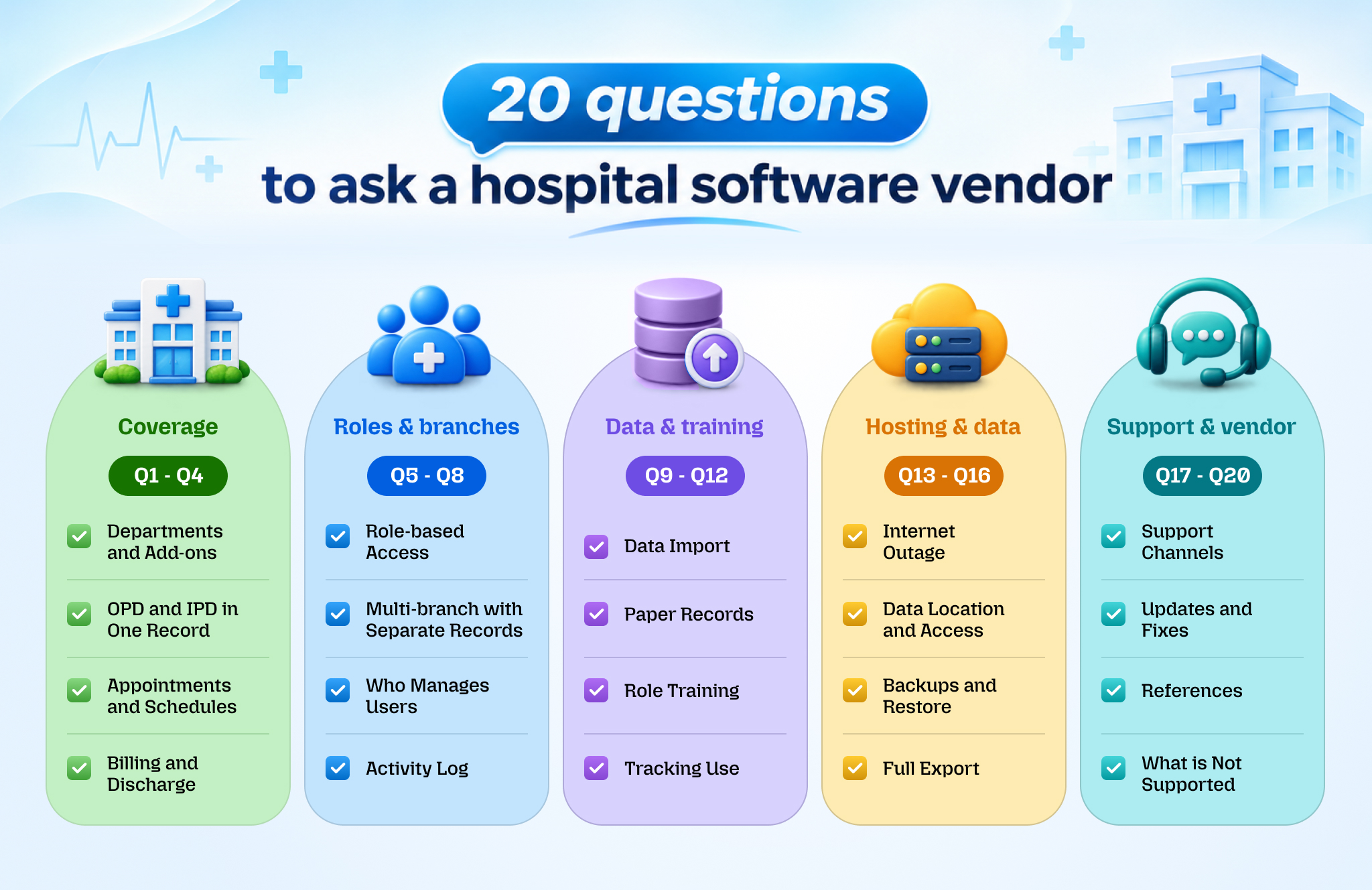
Questions 1 to 4 are the first questions to ask a hospital software vendor about coverage.
A feature list hides gaps. A good answer names each department covered now, shows it working, and states which workflows need an add-on or custom work.
A patient seen in outpatients and later admitted should have one history, not two. A good answer shows the same record in both OPD and IPD screens, with no second registration.
A good answer shows doctor availability, time-slot booking, rescheduling and a calendar view that reception can read at a glance.
Discharge is where items from many departments meet on one bill. A good answer shows an advance payment recorded, items from several departments added to one bill, and a final settlement.
In our HMS, OPD and IPD management, appointments with doctor schedules and time-slot booking, and bed management sit alongside billing with invoices and advance payments.
A hospital management system should give each user only the modules and actions their job needs, keep each branch’s records separate, and let the owner see across branches. One named administrator should control user creation and permissions. Every change to a record should appear in an activity log.
Multi-branch hospital management software must solve a conflict: the owner wants one view, while each branch needs its own records. Security here means practical controls: roles, activity logs, backups, access rules, and data export. Give every user the least access their job allows, and review that access whenever staff changes roles.
Ask the vendor to log in as a receptionist, a nurse, and an accountant in turn. A good answer shows three different screens and blocked access to everything outside each role.
Groups need central control without mixed records. A good answer shows one owner login across branches and a branch user who sees only that branch.
Permission changes are a security control. A good answer names a specific administrator role, shows how a user is created, and shows how a module is turned on or off.
A log lets you trace an error or misuse to a user and a time. A good answer shows a log entry for an edited bill or record, with the user name, date, and time.
In our HMS, a multi-branch hospital management system setup lets an owner manage all hospitals and staff from one Admin account. Each hospital keeps its own staff and records, and the Hospital Admin creates users, assigns roles, and sets permissions.
Ask how existing patient and stock data will move into the new system, in which file formats, and who checks the result. Ask how each role is trained on its own daily tasks. Then ask how your team will measure real use after launch.
Decide which records are imported, which are scanned, and which stay on paper. Ask for a trial import of your own sample data before you commit to any vendor.
Patient lists and medicine stock often sit in spreadsheets or an older system. A good answer names the accepted formats, shows a sample import, and explains how errors and duplicates are reported.
Paper records do not disappear at launch. A good answer separates records to import, records to scan, and records to keep on paper, and explains how staff find old information.
A good answer offers role-based sessions using your own workflows, plus written guides staff can use afterwards.
A system can be installed and still ignored. A good answer shows usage data such as logins and records created per role or department, and names a person on your side who reviews it.
A cloud-based hospital management software runs on the vendor’s hosted servers and is accessed over the internet. An on-premise system runs on servers inside your facility. Cloud suits groups with several branches and reliable internet. On-premise can suit a single site with unreliable internet, a strong IT team, and a need to keep data on local servers.
How to choose a hospital management system between these two models depends on three facts: internet reliability, IT capacity, and the number of branches.
Staff at all branches use one system, and the vendor usually runs the servers, updates, and backups. The trade-offs: daily work depends on internet access, and your data sits on the vendor’s servers, so you rely on the vendor’s controls and continuity.
Staff keep working on the local network when the internet fails, and your IT team controls hardware, access and data location. The trade-offs: your team must run servers, backups, security updates and hardware replacement, and remote branches need secure network links.
Some vendors offer a local server with remote access or limited offline use. Ask which tasks still work offline.
Choose on-premise when internet is unreliable, and your IT team can run servers; choose cloud when branches need shared access.
Every country has outages. A good answer states plainly what staff can and cannot do during one and how work is recorded afterwards. A vendor with no offline option should say so.
Hosting location and access rights decide who controls your records. A good answer names the hosting location, states which vendor staff can reach your data and under what controls, and confirms that your facility owns its data.
A good answer states how often backups run, where copies are kept, and whether the vendor has tested a restore.
Your records must stay usable after a contract ends. A good answer lists export formats, covers patient records, invoices and stock, and says whether open formats such as HL7 FHIR are supported for clinical data.
In our HMS, the system is cloud-based and made for hospitals, clinics, and other medical businesses.
Ask a hospital software vendor four things. First, which support channels exist and when. Second, how updates and fixes are released. Third, which references from similar facilities it can show. Fourth, what the product cannot do today. A vendor that names its limits honestly is easier to trust than one that says yes to everything.
Support matters most when a department cannot work. A good answer lists the channels, such as phone, chat, and email, states support hours in your time zone, and explains how urgent faults are escalated.
A good answer explains how updates are announced, how they reach your system, and how kz vurucvv eo klz x bcaibp cjbudv.
A reference from a facility with your size and workflows tells you more than a brochure. A good answer offers a call or visit with a similar hospital or clinic.
A good answer names specific gaps, such as a missing workflow or integration, and says whether each is planned, available as an add-on, or not offered.
A hospital management system demo should use your own scenarios, not the vendor’s script. Walk each shortlisted vendor through one complete patient journey, have each role do its real daily tasks, then pilot the best fit in one department or branch with written pass or fail criteria. Score every vendor against the same weighted scorecard.
Score every vendor on the same scenarios, with the same staff, using the same written criteria. Use this hospital management software demo checklist with each shortlisted vendor.
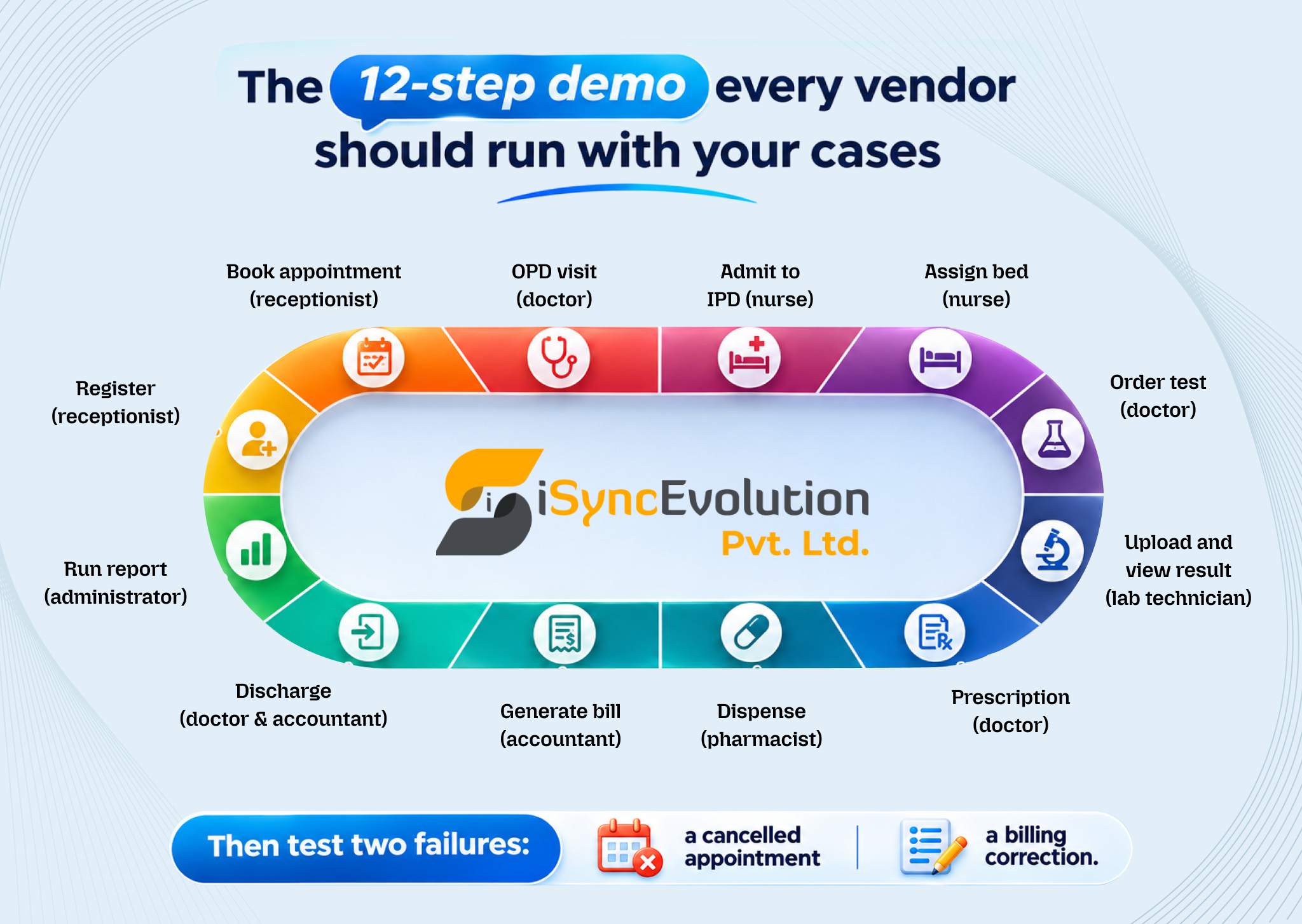
Ask each vendor to run these 12 steps live, using your own sample cases. Include one walk-in patient, one booked patient, and one patient who pays an advance.
Then add two failures: cancel an appointment and correct a billing error. Watch how the system records each change.
Let your own staff operate the screens while the vendor watches.
| Role | Daily task to test | What to check |
|---|---|---|
| Receptionist | Register, book and take an advance payment | Clear screens, few errors |
| Doctor | View schedule, record a visit, order a test | Few steps, clear record |
| Nurse | Admit a patient and update bed status | Correct bed assignment |
| Pharmacist | Dispense a prescription and update stock | Stock adjusts correctly |
| Lab technician | Receive an order and upload a result | Result reaches the doctor |
| Accountant | Check invoices, payments, and a financial report | Totals match the bills |
Run the pilot in one department or branch, with real staff doing live work in that area. Write pass or fail criteria before it starts. Examples: reception books patients without vendor help; bills match your manual records for the same patients. Agree in writing who judges the result and what happens on a fail.
Give each criterion a weight, score each vendor against it, multiply and add. Set the weights before the demos so a vendor’s presentation cannot move them. How to choose a hospital management system from a shortlist then comes down to the totals and the pilot result.
| Criterion | Weight | Vendor A | Vendor B |
|---|---|---|---|
| Workflow fit in the demo script | ___ | ___ | ___ |
| Roles, branches and access control | ___ | ___ | ___ |
| Data import and training | ___ | ___ | ___ |
| Outage, backup and export | ___ | ___ | ___ |
| Support, updates and references | ___ | ___ | ___ |
| Staff feedback from the pilot | ___ | ___ | ___ |
A red flag is an answer that avoids your question or cannot be shown working. Watch for vague replies, demos that never leave the vendor’s script, and refusal to name limits. Any of these should lower a vendor’s score until you get a specific, demonstrated answer.
A vendor that cannot name a single limitation has either not looked or is not telling you. Use these red flags as a filter when deciding how to choose a hospital management system from a shortlist.
Choosing a hospital management system is not just about comparing features or selecting the vendor with the longest module list. It is about finding a solution that fits your hospital's workflows, supports your staff, protects patient information, and adapts to your operational requirements as your facility grows.
Before making a decision, evaluate vendors using the same 20 questions. Test your actual patient journey during the demo, involve staff from different departments, verify data migration and access controls, and run a pilot with clearly defined success criteria. This approach helps you identify limitations before committing to a system and reduces the risk of choosing software that does not work well in daily operations.
iSyncEvolution HMS is a cloud-based hospital management system designed for hospitals, clinics, and other healthcare businesses. It brings essential operations together, including OPD and IPD management, appointment scheduling, bed management, billing, pharmacy and laboratory workflows.
Instead of relying on a feature list, evaluate our HMS against your actual requirements and patient-journey scenarios. Our team can walk you through the system and help you understand how it fits your facility's needs.
Ready to explore the right HMS for your healthcare facility? Talk to our team to discuss your requirements and schedule a product demonstration.
An HMS manages the daily operations of a hospital or clinic, while an EHR stores a patient’s clinical history. An HMS typically covers registration, appointments, billing, beds, pharmacy and laboratory workflows. An EHR focuses on diagnoses, notes, results and prescriptions. Some products combine both, so ask each vendor which records and operations its system covers.
A small clinic usually needs patient registration, appointment booking, consultation records, and billing first. Pharmacy stock and laboratory orders come next if the clinic dispenses medicines or runs tests on site. Add IPD and bed management only if the clinic admits patients. List your actual workflows before comparing modules.
A cloud-based HMS can be safe when the vendor and your facility apply practical controls. Check role-based access, an activity log, regular backups with tested restores, controlled vendor access to your data, and a full data export. Ask the vendor to show each control working. No hosting model is safe without them.
Yes, many systems can manage multiple branches, but the design varies. Ask whether one owner login covers all branches, whether each branch keeps separate staff and records, and whether reports can be run per branch and across the group. Test it in the demo with two branch accounts before you decide.
Test an HMS in three steps. First, run a patient-journey demo using your own scenarios. Second, have each role, from receptionist to accountant, perform its real daily tasks. Third, run a small pilot in one department or branch with written pass-or-fail criteria. Score every vendor on the same weighted scorecard.
Nikhil Shah is the CTO and Co-Founder of iSyncEvolution, an engineering leader who aligns modern technology best practices with long-term commercial success. A veteran of cloud infrastructure and scalable web/mobile solutions, he specializes in building high-performance software environments. Nikhil helps global brands master their technical roadmaps, optimizing both code performance and development economics to fuel growth.
© 2026 iSyncEvolution Pvt Ltd. All Rights Reserved.