
22 June, 2026

Most developers know the Next.js documentation. Very few know how to make the architecture decisions that determine whether your app scales, performs, and stays maintainable eighteen months after launch. That gap shows up in three places you feel directly: your infrastructure bill, your Core Web Vitals, and the rewrite conversation you're forced into six months later.
You've been here before. A developer or agency claimed Next.js expertise, showed you a portfolio of fast-looking sites, quoted a reasonable price, and started shipping code. Six months later, you're staring at a Vercel bill that doubled, Core Web Vitals in the red, and an architecture your new senior engineer says needs a rebuild. Knowing how to hire Next.js developers who avoid that outcome is not about luck; that failure pattern is the predictable result of hiring without the right evaluation framework. Here is the framework.
A dedicated Next.js developer is a full-time or near-full-time engineer assigned exclusively to your project, not shared across multiple clients. In 2026, genuine Next.js expertise means fluency in App Router architecture, Server Components, rendering strategy decisions, and production-grade caching, not just the ability to ship screens using the framework.
Next.js has become the default framework for React web development, so almost every developer and agency now lists it on their website. But the gap between developers who can use Next.js and developers who can architect production Next.js applications has never been wider. Understanding that gap is the first filter in your hiring decision and the one that protects you from the rewrite conversation later.
A developer who learned Next.js during the Pages Router era is, for hiring purposes, a different hire from one who has shipped App Router applications under production load.
Most developers learned `getStaticProps`, `getServerSideProps`, and the `_app.tsx` pattern. The shift to App Router, Server Components, and streaming in Next.js 13 through 16 created an architectural knowledge gap that many developers have not closed.
That older knowledge doesn't transfer cleanly. The mistakes that follow over-fetching, mis-cached routes, and hydration waterfalls are expensive to fix later and rarely surface during interviews. For you, that means the cost of the wrong hire lands months after the contract is signed.
The single most expensive production mistake from under-qualified Next.js developers is adding use clientto components unnecessarily, turning a Next.js app back into a React SPA and negating every server-side performance and SEO benefit you paid for.
A developer who misunderstands the Server Component boundary doesn't just ship slower pages. They ship pages that don't index correctly, generate unnecessary serverless invocations, and require architectural rework rather than incremental fixes, three line items that show up in your bill and your search traffic.
This structural mistake is entirely invisible in a portfolio review, only surfacing once the application hits true production load. Ultimately, a developer's rendering choices dictate whether a platform scales fluidly or quietly accumulates technical debt, particularly when evaluating how Partial Prerendering changes Next.js performance and cost to balance user experience with cloud budget overhead.
A genuinely expert Next.js developer makes deliberate decisions rather than defaulting to framework patterns.
These are judgment calls that come from building real applications under production constraints, not from reading documentation. They are also the difference between a predictable bill and a runaway one.
These questions are not about testing knowledge of the documentation. Any developer can read the docs. These questions test production judgment, the ability to make architectural decisions under real constraints. A developer who gives vague or theoretical answers is signalling the level of work you'll actually receive once the project is underway.
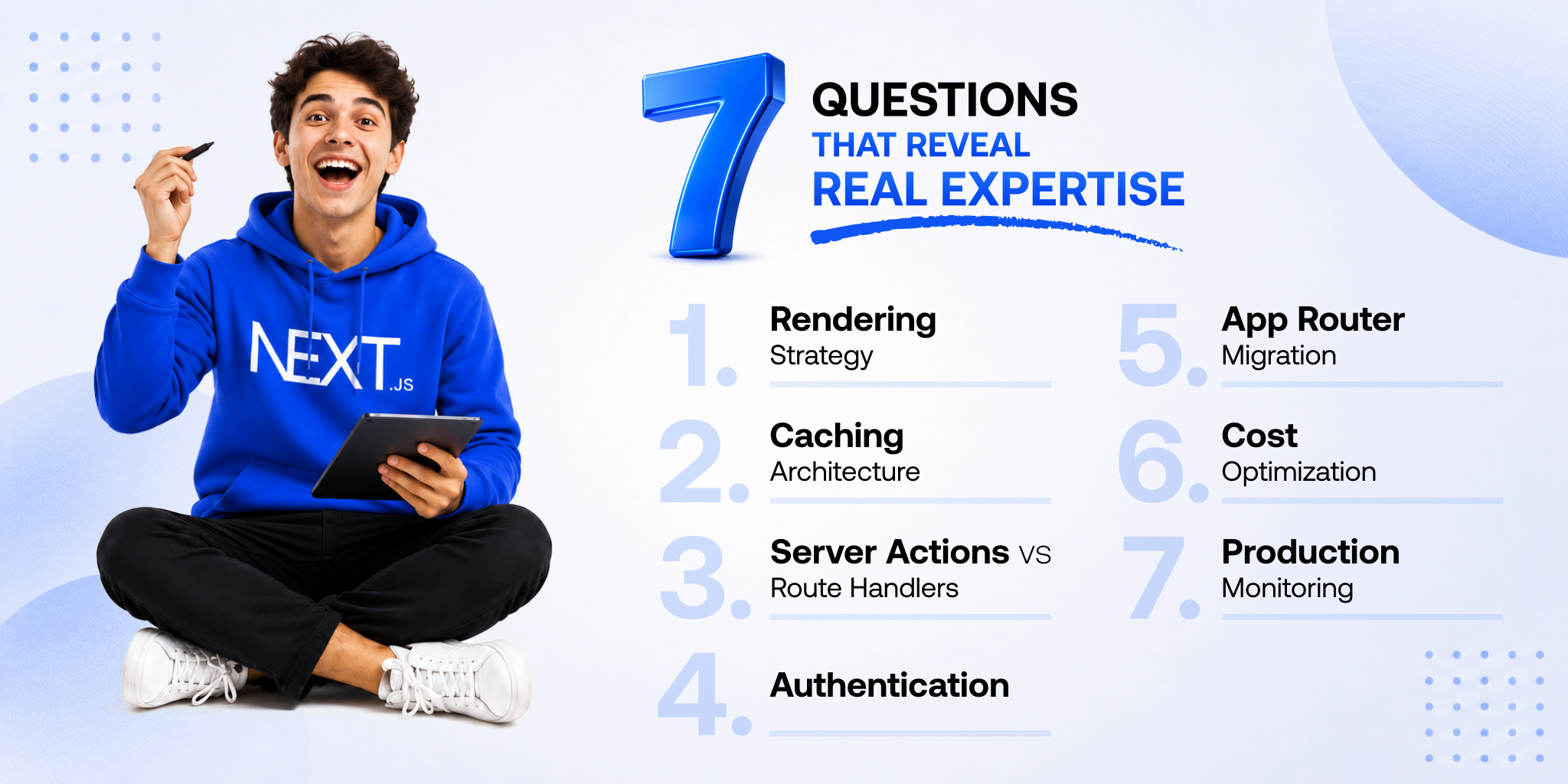
Ask: "Given a product detail page with static copy, dynamic pricing, and real-time stock, how would you architect the rendering strategy?"
A strong answer immediately identifies this as a PPR candidate: static shell served from the CDN edge, dynamic holes for price and stock streamed from the server. They explain the cost difference versus full SSR and define a fallback when dynamic data fails.
A weak answer gives a binary SSR-or-SSG choice and never mentions PPR, streaming, or cost implications.
Ask: "Walk me through Next.js 16's four cache layers and how you'd manage invalidation for a SaaS dashboard where users see different data on the same route."
A strong answer names the four layers: Request Memoization, Data Cache, Full Route Cache, Router Cache, and explains how they interact. For the multi-tenant case, they identify that full route caching is inappropriate and use dynamic rendering with user-scoped fetching.
A weak answer conflates layers or suggests `revalidatePath` without addressing the multi-tenant complexity.
Ask: "When would you use a Server Action versus a Route Handler in a Next.js 16 application?"
The distinction is clear in a strong answer: Server Actions belong in form mutations and internal UI-triggered state changes, while Route Handlers belong where you need specific HTTP status codes, programmatic external access, or complex API logic that doesn't fit a Server Action.
A strong candidate also flags that using Server Actions for everything is an anti-pattern that creates maintenance and debugging problems at scale.
Ask: "How do you handle authentication in a Next.js App Router application, and where does middleware fit?"
A strong answer immediately flags that middleware is not a security boundary. It runs at the edge and is designed for routing, not auth enforcement; real checks live in Server Actions, Route Handlers, and the Data Access Layer.
They reference CVE-2025-29927 as context for why this matters. A weak answer treats middleware as the primary auth mechanism, the exact pattern that caused the vulnerability.
Ask: "We have an existing Pages Router application. How would you migrate to App Router without freezing feature delivery?"
A strong answer proposes incremental migration, keeping authentication and legacy workflows in Pages Router while moving new surfaces into App Router. Both routers coexist in a single application, so a big-bang rewrite is unnecessary and high-risk.
A weak answer proposes a full rewrite or doesn't know that the routers can coexist.
Ask: "Our Vercel bill is growing faster than our user count. Where would you look first?"
A strong answer goes straight to invocation count per active user auto-saves, hover prefetch, and Server Actions without connection pooling, causing database connection storms. They identify routes rendering dynamically that should be static.
A weak answer suggests upgrading the plan or compressing images. This question matters most for US and UK SaaS teams whose Vercel spend scales faster than ARR, which is why engineering teams rely on a structured guide to cutting Next.js SaaS costs with Server Actions to eliminate redundant middleware executions and expensive serverless compute timeouts.
Ask: "How do you monitor a Next.js application in production and attribute performance issues to specific routes?"
A strong answer describes per-route performance attribution, not aggregate dashboards. They instrument Server Components and Server Actions separately, set alerts on route latency thresholds, and distinguish Vercel's built-in analytics from what serious production debugging requires.
A weak answer describes setting up Google Analytics or checking the Vercel dashboard.
You don't need to be a Next.js expert to spot a weak Next.js vendor. The red flags show up in how vendors talk about their work long before you ever see the code. These are the signals that reliably predict a bad outcome before you sign anything.
A portfolio full of fast-looking sites with no explanation of the architectural decisions behind them proves design capability, not Next.js expertise.
Look for case studies that name rendering strategy choices, infrastructure cost outcomes, and Core Web Vitals improvements with context. Generic "we used Next.js for performance" copy without specifics usually means the developer inherited the framework choice rather than made it deliberately.
Run PageSpeed Insights on any live portfolio URL in sixty seconds, and the React indexing problems that signal shallow Next.js work show up in the report immediately.
A proposal that jumps straight from requirements gathering to development with no architecture phase describes a process where the most consequential decisions get made under delivery pressure.
A vendor who recommends a full rewrite before auditing your current stack is optimizing for billing hours, not your outcome.
Pay attention to how they handle accountability questions, who owns the IP, what happens if the relationship ends mid-project, and who responds to a 2 am production incident in the first 90 days. Hesitation here means you carry that risk alone.
And vendors who can't answer the technical questions from the previous section with specific opinions, not documentation references, are telling you their Next.js knowledge is surface-level.
The hiring model matters as much as the individual skill level. A highly skilled freelancer in the wrong engagement structure produces the same outcome as a mediocre developer; you just pay more for it. Here is the honest breakdown of when each model works and when it quietly fails.
Each hiring model fits a specific type of work and breaks down predictably when you push it past that fit.
| Model | Best Fit | Breaks Down When |
|---|---|---|
| Freelancer | Defined scope under 3 months, single feature, or quick performance audits. | Long-term builds, ongoing production support, or when deep architecture ownership is required. |
| Dedicated Developer / Team | Production apps, complex business domains, and continuous post-launch evolution. | Tiny, one-off scopes where project context and long-term onboarding overhead are minimal. |
| Development Company (Shared Model) | Multi-discipline projects requiring integrated design, development, and dedicated QA tracks. | When the same core engineers are not assigned to your product lifecycle end-to-end. |
The single biggest risk with a Next.js freelancer is the bus factor if they leave mid-project; every architectural decision they made leaves with them.
Dedicated Next.js developers win because the engineers who designed the architecture are the same engineers maintaining it six months later.
That continuity eliminates the handoff problem. Context doesn't get lost between the person who scoped the rendering strategy and the person who ships the next feature against it. For US and UK companies running production Next.js applications, this is the model that consistently protects delivery quality after launch, and it's why most dedicated Next.js teams are now structured around named engineers rather than rotating bench resources.
Choosing a freelancer for a long-term engagement creates costs that only surface months later, and they rarely appear in the original quote.
The quality of a Next.js hire reveals itself faster than most buyers expect. The first 30 days contain enough signal to tell you whether you made the right decision if you know what to look for before week one starts.
A Next.js team that starts shipping screens in week one without an architecture document is making your most expensive decisions under delivery pressure.
The first two weeks should produce a written architecture covering rendering strategy per route type, caching approach across the four cache layers, authentication model, and deployment configuration. You should receive this before a single product feature is built.
If the team skips this and goes straight to feature output, the pattern you see in month one will be worse in month six.
By day 30, a properly functioning dedicated Next.js team should have shipped specific, verifiable deliverables, not just code commits.
Code without architecture documentation in month one predicts rewrite conversations by month six.
Knowing how to hire Next.js developers comes down to a single principle: forcing the architectural conversation before a contract is signed, not after a blown infrastructure bill arrives. The right partner makes deliberate, data-centric design choices before writing a single line of product code, measuring engineering success against stable cloud costs and strict Core Web Vitals targets rather than mere feature velocity.
Every successful engagement is built from that exact sequence. If a previous build left you carrying mounting technical debt, rising Vercel costs, or a brittle architecture that requires a total overhaul, you don’t necessarily need a blind rewrite. You need truth.
Transitioning your platform into a highly optimized, enterprise-ready layout starts with partnering with iSyncEvolution, who understand how to scale performance efficiently. Securing a structured, high-performing frontend architecture begins with deploying dedicated Next JS development services tailored to eliminate hidden edge-compute overhead and secure your production roadmap from day one.
Run the seven technical questions in this guide during evaluation of rendering strategy, caching layers, Server Actions versus Route Handlers. Genuine expertise produces specific, opinionated answers. Shallow expertise produces vague documentation references.
One to two weeks. The output is a document covering rendering strategy per route, caching approach, authentication model, and deployment configuration. Any team skipping this phase is making architectural decisions under delivery pressure.
A dedicated developer works exclusively on your project and maintains context across the full engagement. Freelancers typically split across clients and carry higher continuity risk on long-term builds where architectural consistency matters.
A working architecture scaffold with correct Server Component boundaries, at least one production-ready feature with tests, a CI/CD pipeline, and a documented rendering strategy. Code without architecture documentation in month one predicts worse outcomes by month six.
Ask when they would add "use client" to a component and when they wouldn't. The answer should be specific about interactivity and browser APIs, not a general preference. Broad use of client usage signals shallow App Router understanding.
Nikhil Shah is the CTO and Co-Founder of iSyncEvolution, an engineering leader who aligns modern technology best practices with long-term commercial success. A veteran of cloud infrastructure and scalable web/mobile solutions, he specializes in building high-performance software environments. Nikhil helps global brands master their technical roadmaps, optimizing both code performance and development economics to fuel growth.
© 2026 iSyncEvolution Pvt Ltd. All Rights Reserved.